Importing data into Outperform Planning using Excel template
When using Outperform Planning the master data will usually already exist in an ERP system and will then be integrated to Outperform planning by using an appropriate ERP data connector, ensuring consistent and automatic updates of data. However, in the absence of an ERP system or where the ERP data connector is not yet available, there is the option to import data into Outperform Planning using Excel.
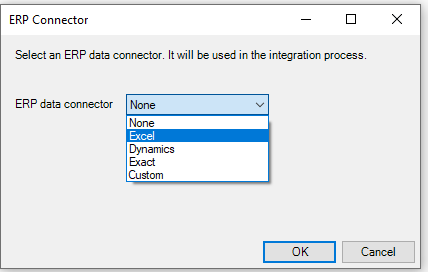
This is done by following the detailed instruction as described in the set of articles called “Excel ERP Template.....”. These articles guide you through the process of completing the excel workbook with 15 sheets of data. The data in this workbook is all incoming data.
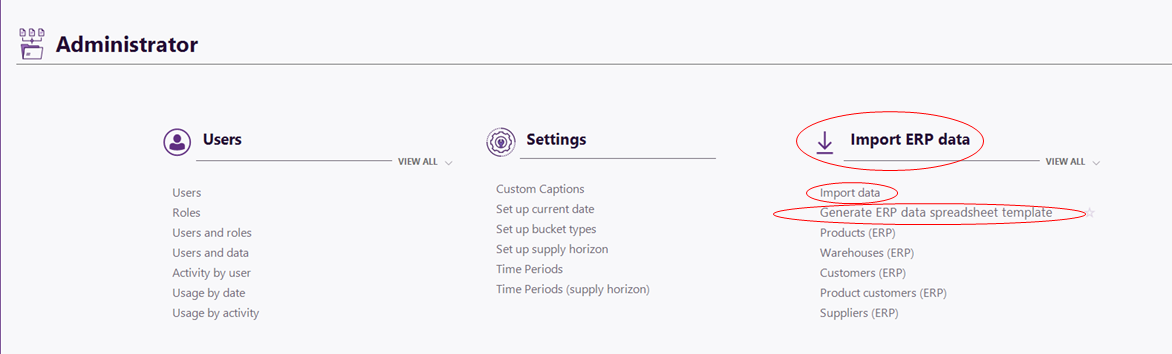
The template workbook can be downloaded from within the application by going to the Administrator group in the side bar, and in the “Import ERP data” section selecting “Generate ERP data spreadsheet template”. Alternatively, it is possible to download the template when selecting the ERP data connector in the application settings.
Once the workbook has been completed, it can be imported by selecting “Import data”, in the “Import ERP data” section.
See also this video: Importing data into Outperform Planning using Excel template
Comments
0 comments
Please sign in to leave a comment.